
- Posted on
- • Uncategorized
In-Engine Deformation for Artists
- Author
-
-

- User
- admin
- Posts by this author
- Posts by this author
-
A client had a simple ask — but one that revealed a surprisingly common pain point in many production workflows.
Having to deform low-resolution building models in Maya before importing to the game engine wasn't optimal. It was difficult to achieve the look that they wanted in a short time - the process was painful to iterate upon and the workflow destructive: deform in Maya, export to the game engine, review the result, back to Maya to make more tweaks on the deformation.
What they really wanted was a way to deform their assets directly inside the game engine, in a simple, intuitive and interactive manner. On top of that, they needed the system to support fine-tuning asymmetric deformations on irregularly shaped buildings. Default rectangular-shaped lattices won't be easy to work with in many of these cases.
The target project for this tool is highly optimised for mobile consoles, relying on very low-resolution geometry — so there aren’t many polygons to work with.
First, let's take a look at the final system in action and how the artist interacts with it:

As far as the controls, it simply allows the artist to manipulate the simple geometry with push and pull forces in the form of spheres.
There is a lattice that can be visualised (along with force distribution), however the lattice simply acts as a dampener and distributor of forces as opposed to a control interface.

Because the artist is manipulating a force emitter freely across 3D space, they can very easily manipulate within the bounds of a square lattice to apply deformation on irregularly shaped buildings.
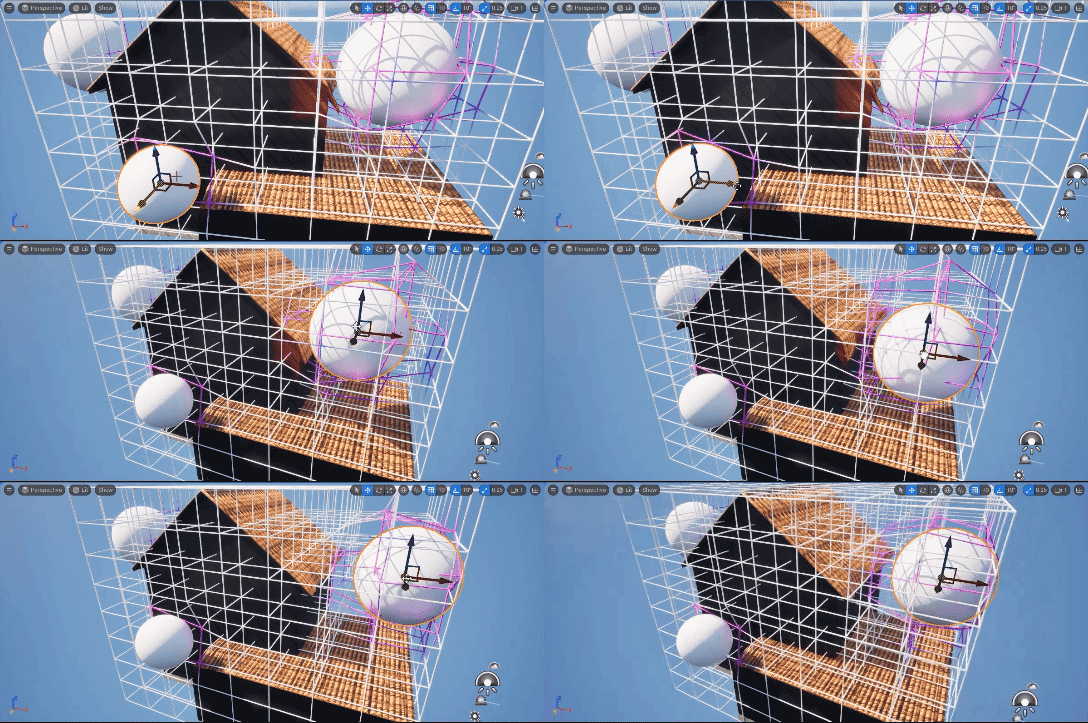
So far, we've used a rectangular lattice to capture the underlying geometry, but the system can also generate a lattice that conforms to irregularly shaped buildings. It does this by casting rays in six directions — +X, -X, +Y, -Y, +Z, and -Z - from the centre of each lattice 'voxel'. By evaluating the ray intersection results, we can determine weather parts of the lattice is inside or outside of the structure.

What if the artist wants some building materials to deform more than others? In some projects we've encountered artists who tend to work with one block of geometry and apply various materials to that geometry to represent windows, doors etc. Materials are sometimes arbitrarily named too. So, in this case we give them an option to choose the specific materials they'd like to add custom deformation weights to:

Internally, Mask by Material is just simple code that takes in user inputs for "material" and "deform_weight", compares it with all incoming materials currently applied to the geometry, and applies the appropriate deform weights to each match. The system will transfer and apply these deform weights via the force emitter later.
// UI Checkbox control
int use_mask = chi("../material_mask"); // 1 = on, 0 = off

// Default deform weight
f@deform_weight = 1.0;

// Get material string from game engine
string mat = s@unreal_material_copy;

// If masking is turned OFF, all weights default to 1.0
if (use_mask == 0)
{
    f@deform_weight = 1.0;
}
else
{
    // Only apply masking if checkbox is ON
    int npoints = npoints(1);

    for (int i = 0; i < npoints; i++)
    {
        string user_mat    = point(1, "material", i);
        float user_weight  = point(1, "deform_weight", i);

        if (match(user_mat, mat))
        {
            f@deform_weight = user_weight;
            break; // stop once a match is found
        }
    }
}
We can take a look at the difference below. The image on the left shows deformation weights set to 0 on the windows and wooden materials. On the right image, deformation weights are cranked up to the max for wooden materials - allowing full deformation.

Code Reference
Force Emitter
// Parameters
float max_dist   = chf("max_distance");     // global influence multiplier
float strength   = chf("deform_strength");  // base deform intensity

// Noise controls
float noise_freq   = chf("noise_frequency");  // frequency of noise
float noise_amp    = chf("noise_amplitude");  // strength
float noise_offset = chf("noise_offset");     // offset for variation

vector total_offset = {0,0,0};
float total_falloff = 0.0;

// Loop over all influence spheres
int npts = npoints(2);
for (int i = 0; i < npts; i++)
{
    vector sphereP = point(2, "P", i);
    float radius   = point(2, "radius", i);
    float range    = radius * max_dist;

    float dist = distance(@P, sphereP);
    if (dist > range)
        continue;

    // Falloff (bell curve)
    float norm = dist / range;
    float falloff = 1.0 - pow(norm, 2.0);
    falloff = clamp(falloff, 0, 1);

    // Direction toward sphere
    vector dir = normalize(sphereP - @P);

    // Apply 3D noise modulation
    float n = noise(@P * noise_freq + noise_offset);
    n = fit(n, 0, 1, 1 - noise_amp, 1 + noise_amp);

    float deform = min(strength * falloff * n, dist);

    total_offset += dir * deform;
    total_falloff += falloff;
}

//Apply material-based weight
float w = clamp(f@deform_weight, 0, 1);

if (total_falloff > 0 && w > 0)
{
    @P += total_offset * w;  // scaled by material influence
    f@falloff = clamp(total_falloff, 0, 1) * w;
    @Cd = lerp({0,0,1}, {1,0,0}, f@falloff);
}
Lattice voxel culling
// Inputs:
// 0 = packed cube (point cloud)
// 1 =  geometry

float cube_size = chf("cube_size");     // approx voxel edge length
float ray_len = cube_size * 1.2;        // ray travel distance
float hit_tolerance = chf("hit_tolerance"); //  buffer

vector dirs[] = {
    {1,0,0}, {-1,0,0},
    {0,1,0}, {0,-1,0},
    {0,0,1}, {0,0,-1}
};

int hit = 0;

foreach (vector d; dirs)
{
    vector hitP, hituv;
    int prim = intersect(1, @P, d * ray_len, hitP, hituv);

    if (prim >= 0)
    {
        float dist = distance(@P, hitP);
        if (dist <= ray_len + hit_tolerance)
        {
            hit = 1;
            break;
        }
    }
}

// remove points with no hit
if (!hit)
    removepoint(0, @ptnum);