
- Posted on
- • Uncategorized
In-Engine Deformation for Artists pt. 2
- Author
-
-

- User
- admin
- Posts by this author
- Posts by this author
-
This post continues from "In-Engine Deformation for Artists".
Using that method of course has it's benefits for artists who wants to manipulate traditionally-modelled geometry directly within the game engine. But what if you are using assets generated procedurally via instanced modules? This is where we would need a bit of an extension to our previous method. We'll need to be able to instead send deformations to the vertex shader in a way that will maintain instancing within the game engine in order to keep draw calls as low as possible.
In this example, my deformation system works fine with my procedural building generator, and I am able to get seamless deformations due to special care taken to ensure that topology flows consistently between one module to the next. This ensures that almost every vertex from one module has a corresponding vertex from another module, and thus forces from my deformer can be distributed in a consistent manner across all those module vertices (The particular control point being manipulated in the animation below has a 'pull' force applied to it).
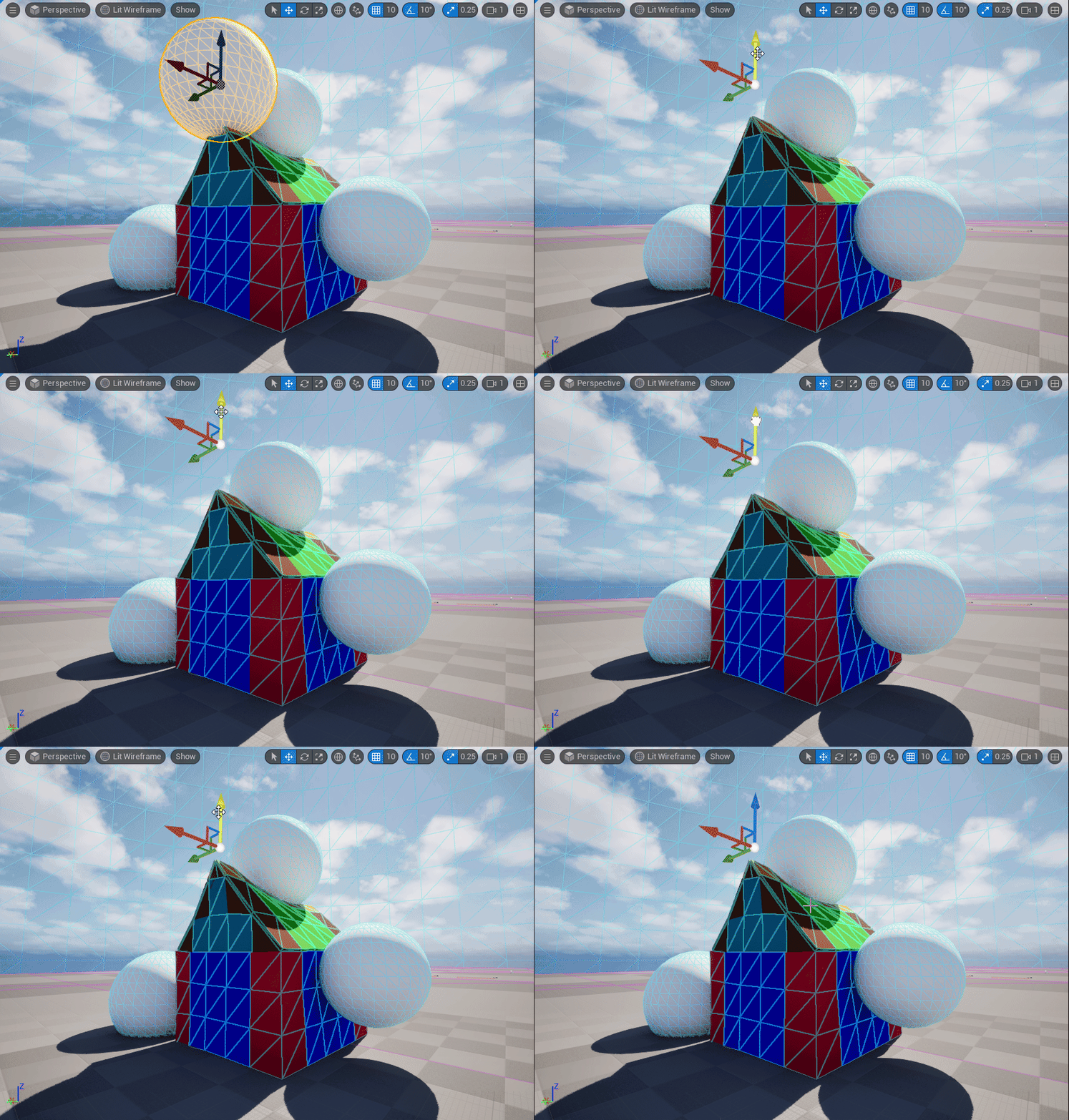
In the previous post, this type of deformation is performed on the geometry itself. This is dangerous to perform on instances as each module will then require it's own draw call.

In order to build a system that is compatible with a non-destructive modular workflow we have to ensure that the following is consistent across instances:
- Vertex count
- Vertex order
- Vertex positions (base mesh)
- UVs
- Vertex normals/tangents
- Material slot count
- LOD structure
It's easy to calculate the offsets for each point in Houdini. Just minus the final deformed position from the rest position. However, points in Houdini does not equal vertices in the game engine. First, we need to assign a point to a corresponding vertex in Houdini and most importantly, track this vertex by ID within the game engine. Unfortunately, vertices are not consistent when round tripping geos between the game engine and external DCCs. This is where tagging vertices by vertex color comes in. The very first step is to encode each vertex ID to a color, and store it in Cd. In Houdini, we make sure our points are unique to each vertex (Unique Points - Facet SOP), then we'll do a Point Sort by Vertex Order.
 Next comes our encoding scheme. The idea is to encode a particular integer, a vertex ID, into colour. So we use this simple scheme in a vertex wrangle:
int idx = @vtxnum;
int r8 = idx % 256;
int g8 = (idx / 256) % 256;
int b8 = (idx / 65536) % 256;

@Cd = set(r8, g8, b8) / 255.0;
This has the potential to store 8 bits of data in each colour channel, for a total of 24 bits or a potential 16 million vertex IDs. I think that's enough as I don't expect a single module to be anywhere near 16 million vertices. Next, I run the entire thing on each module (using a for-each loop) and export the .fbx with those vertex colors baked in.

With the artists now working with modules that have original Vertex IDs baked into the colour attribute, I can do some tricks. On my deformed geo, I decode the vertex colours to get the original IDs:
// Attribute Wrangle Running Over: Vertices

vector cd = v@Cd;

// Decode RGB > integer
int r = int(cd.x * 255.0 + 0.5);
int g = int(cd.y * 255.0 + 0.5);
int b = int(cd.z * 255.0 + 0.5);

i@orig_vert_id = r + g * 256 + b * 65536;
- I'm multiplying by 255 to reverse normalization that was performed earlier.
- Using +0.5 to compensate for potential floating-point precision errors. Now we are back to our original IDs and we pack that into an attribute. Next, we find what point each vertex belongs to and calculate the deltas - or offsets - using both the deformed and rest positions:
int pt = vertexpoint(0, @vtxnum);
vector P_def  = point(0, "P", pt);
vector P_rest = point(1, "P", pt);
v@delta_to_vert = P_def - P_rest;

vector d_point = point(0, "delta", pt);
vector d_vert  = v@delta_to_vert;
We now have everything we need to start sorting these deltas that were calculated based on vertex IDs we can trust and assign them to which particular instance they belong to.
We will later encode all of this information into a single image texture, sort of like Vertex Animation Textures but not quite. The idea is that each horizontal pixel that makes up the width of an image represents a particular vertex offset, and the instance ID is acquired by looking up the vertical location of the pixel. So we need to sort these vertex offsets appropriately.
Code: Vertex Delta Sorting
//  collect instance ids
int instance_ids[]  = uniquevals(0, "vertex", "instance_id");
int num_instances   = len(instance_ids);

vector deltas[];        // final packed deltas for all instances
int    vert_counts[];   // how many verts per instance
int    instance_order[];

// For each instance (row in the texture)
foreach (int inst; instance_ids)
{
    // All vertices belonging to this instance
    int verts[] = findattribval(0, "vertex", "instance_id", inst);
    int count   = len(verts);

    if (count == 0)
        continue;

    // Local arrays for this instance
    int    ids[];
    vector vd[];

    resize(ids, count);
    resize(vd,  count);

    // Fill with ID + delta for each vertex
    for (int i = 0; i < count; i++)
    {
        int vtx = verts[i];

        int    id = vertex(0, "orig_vert_id",   vtx);
        vector dv = vertex(0, "delta_to_vert",  vtx);

        ids[i] = id;
        vd[i]  = dv;
    }

    // ---- Selection sort by ids[], keeping vd[] in sync ----
    for (int i = 0; i < count - 1; i++)
    {
        int min_i = i;
        for (int j = i + 1; j < count; j++)
        {
            if (ids[j] < ids[min_i])
                min_i = j;
        }

        if (min_i != i)
        {
            // swap ids
            int tmp_id = ids[i];
            ids[i]     = ids[min_i];
            ids[min_i] = tmp_id;

            // swap deltas in same way
            vector tmp_d = vd[i];
            vd[i]        = vd[min_i];
            vd[min_i]    = tmp_d;
        }
    }
    // ---- end sort ----

    // Store counts/order
    append(vert_counts,   count);
    append(instance_order, inst);

    // Append sorted deltas into the global deltas[] array
    for (int i = 0; i < count; i++)
    {
        append(deltas, vd[i]);
    }
}

//  store in detail attribs for texture exporter
setdetailattrib(0, "deltas",        deltas,        "set");
setdetailattrib(0, "num_verts",     vert_counts,   "set");
setdetailattrib(0, "instance_order",instance_order,"set");
setdetailattrib(0, "num_instances", num_instances, "set");
The code above essentially takes all per-vertex deformation deltas and arranges them into a perfectly sorted, instance-segmented structure that will exactly match the pixel layout of the Vertex Delta Map texture we'll be generating later. It guarantees that a particular vertex ID - x, in instance y will always map to pixel (x, y) in the final deformation texture.
All that's left now on the Houdini side is our image exporter, which can be written in fairly simple python. We'll use the Python Imaging Library for this:
Code: Python Vertex Delta Texture exporter:
import hou
import numpy as np
from PIL import Image

# Get geometry from this node
geo = hou.pwd().geometry()

# === 1. Read detail attributes generated in VEX ===
deltas       = geo.attribValue("deltas")
point_counts = geo.attribValue("num_points") if geo.findGlobalAttrib("num_points") else geo.attribValue("num_verts")
instance_order = geo.attribValue("instance_order")
num_instances  = geo.intAttribValue("num_instances")

# === 2. Convert deltas to NumPy array ===
deltas_np = np.array(deltas, dtype=np.float32).reshape((-1, 3))

# Houdini → Unreal axis conversion (meters → centimeters)
deltas_np = np.stack([
    deltas_np[:, 0] * 100.0,   # X
    deltas_np[:, 2] * 100.0,   # Z → Y
    deltas_np[:, 1] * 100.0    # Y → Z
], axis=-1)

# === 3. Pack the deltas into a 2D texture grid ===
max_points = max(point_counts)
height     = num_instances
width      = max_points

img = np.zeros((height, width, 3), dtype=np.float32)

v_start = 0
for row, num_pts in enumerate(point_counts):
    row_data = deltas_np[v_start : v_start + num_pts]
    img[row, :num_pts, :] = row_data
    v_start += num_pts

# === 4. Normalize to 0–1 range for 8-bit texture ===
R = 50.0  # max deformation supported (in cm)

img = np.clip(img, -R, R)          # clamp range
img = (img / (2.0 * R)) + 0.5      # remap to 0–1
img8 = np.clip(img * 255.0, 0, 255).astype(np.uint8)

# === 5. Save texture ===
save_path = "E:/tmp/vertex_delta_texture.png"
Image.fromarray(img8, mode='RGB').save(save_path)
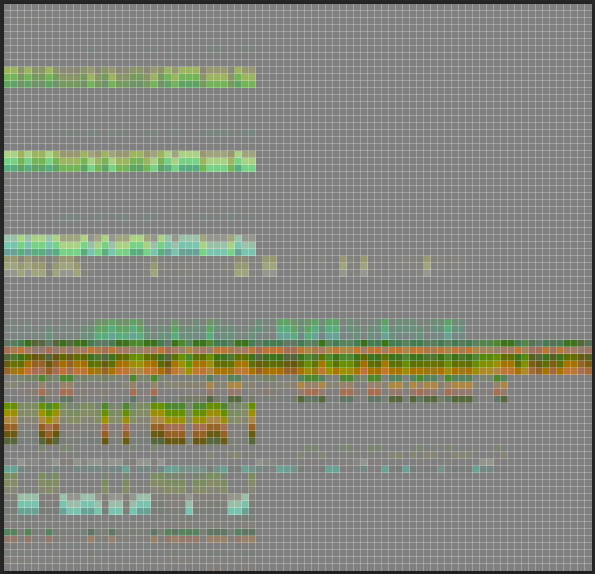
This code writes out a very small image to disk. For our simple house example here, it comes to around 84px x 81 px and only about 6kb on disk.
The Vertex Delta Texture, or VDT as I'm calling it, is a texture that stores per-vertex deformation offsets for every instanced module in our system. At runtime, the game engine will read this texture inside our material function and applies displacement.
The Vertex Delta Texture, magnified 700%
Now let's prepare for Unreal Engine. First, we export a list of per_instance_custom floats that our vertex shader will be needing. About 4 were enough for me: int do_deform = chi("do_deformation_toggle");
i@instance_id = @ptnum;
f@px_height = float(npoints(0)); //height
f@px_width = float(detail(1, "max_verts",0)); //width

i@unreal_num_custom_floats = 4;
f@unreal_per_instance_custom_data0 = float(i@instance_id);
f@unreal_per_instance_custom_data1 = float(f@px_height);
f@unreal_per_instance_custom_data2 = float(f@px_width);
f@unreal_per_instance_custom_data3 = float(do_deform);
Remember how we decoded the Vertex colors earlier to get our original vertex IDs? Well, we start by doing exactly that in our shader. Before dividing by the image width to get the correct horizontal pixel that represents the vertex offset for that particular vertex, we add 0.5 to ensure that we are sampling the centre of the pixel:
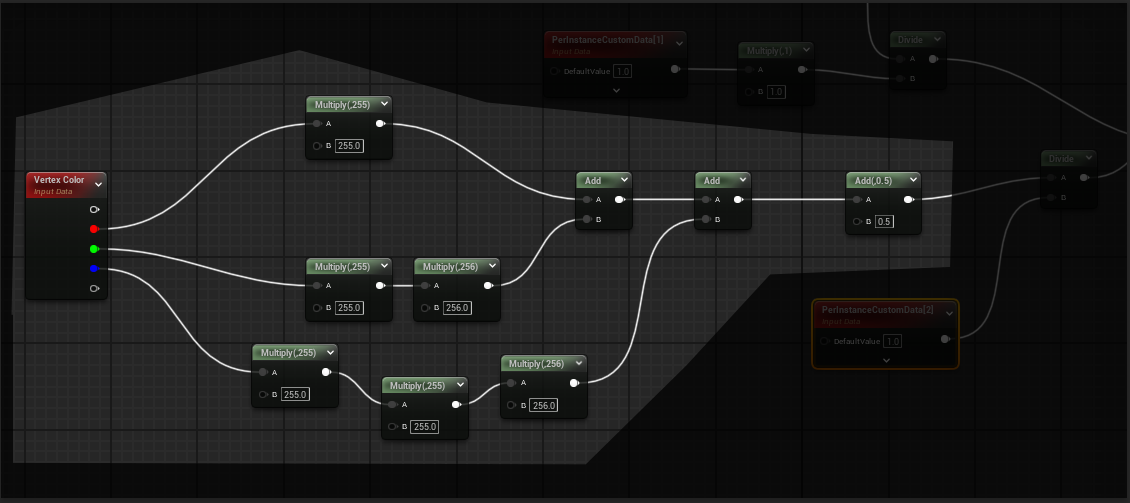
The results from custom data 2 representing the pixel locations in x and the results from custom data 0 and 1 representing instance IDs in y is fed into the append node to get the exact UV co-ordinate for each vertex in the texture, thus allowing us to correctly look up the world position offset.

If you are curious, here's the entire shader graph:

And now we get vertex deformation with our shader while maintaining 100% instancing:
